Choosing a complete water cooling kit can simplify a custom PC build while delivering striking aesthetics and strong cooling performance. This guide highlights five top options, spanning premium all-in-one style kits to DIY-ready systems. Each entry covers core components, RGB lighting, and ease of installation to help you compare suitability for your rig.
| Product | Brand | Key Features |
|---|---|---|
| Corsair XH505i RX 360 RGB Kit (Black) | Corsair | XC7 CPU Block, XD6 Pump/Reservoir, RX120 Fans, XR5 Radiator, System Hub, Hardline Tubing |
| Corsair XH505i RX 360 RGB Kit (White) | Corsair | Same core kit with white finish for aesthetics |
| DIY 240mm Water Cooling Kit | Bewinner | CPU/GPU blocks, 240mm rad, LED fans, cylindrical reservoir |
| Thermaltake Pacific C240 Ddc Res/Pump Kit | Thermaltake | 240mm radiator, pump/res, copper radiator, complete loop |
| DIY Water Cooling Kit With CPU/GPU Block | GOWENIC | CPU/GPU block, reservoir, LED fan, 240mm heat sink |
Corsair XH505i RX 360 RGB Kit — Black

Premium Hydro X Series cooling kit designed for striking, flexible hardline loops. Includes XC7 RGB Elite CPU block, XD6 RGB Pump/Reservoir, three RX120 RGB fans, XR5 360mm radiator, and a System Hub for centralized control. The kit emphasizes simple assembly with iCUE LINK integration, enabling synchronized RGB effects across the CPU block, pump, and fans. It’s ideal for enthusiasts seeking a high-end aesthetic with reliable cooling performance for mid- to high-end CPUs and GPUs in spacious cases.
Features highlight robust, individually addressable RGB lighting and a cohesive hardware ecosystem that reduces wiring complexity. The hardline tubing and fittings deliver a clean, professional look, while the included System Hub streamlines control and customization. This kit is best suited for users who want a polished, showroom-worthy build and are comfortable with a more involved assembly process.
Corsair XH505i RX 360 RGB Kit — White

This white edition mirrors the black kit in core components and performance, offering the same iCUE LINK integration for synchronized RGB across the CPU block, pump/reservoir, and fans. White hardware complements lighter-themed builds and showcases the same premium hardline aesthetic with the system hub for simplified control. It suits users pursuing a cohesive visual theme and high-quality cooling capabilities in a clean white finish.
Installation remains aligned with the black variant: modular components, straightforward routing, and comprehensive RGB customization. The kit supports compelling performance for modern CPUs and GPUs while delivering a distinctive, premium look that stands out in build showcases.
DIY 240mm Water Cooling Kit
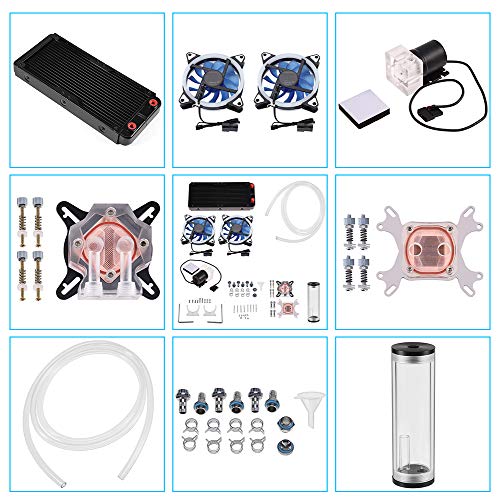
DIY-focused cooling system featuring a 240mm radiator, CPU and GPU blocks, cylindrical reservoir, LED fans, and comprehensive tubing and fittings. The copper-based CPU block supports efficient heat transfer, while the LED fans offer visible RGB accents. The kit emphasizes flexible installation for compact or uniquely shaped cases, with emphasis on achieving a high-performance cooling loop in a customizable, budget-friendly package.
Notable for its clear circulation visibility and modular components, this option is suitable for builders who want to assemble and tweak their cooling loop over time, with emphasis on customization and a balance between performance and cost.
Thermaltake Pacific C240 Ddc Res/Pump Kit
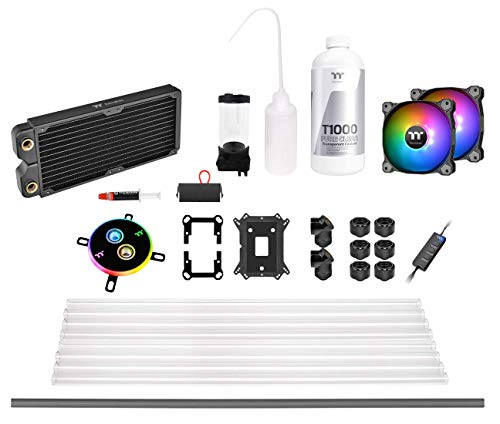
This complete 240mm cooling kit includes a C240 flat-tube copper radiator, pump/reservoir, fans, fittings, tubing, and coolant. The kit emphasizes a slim 27mm radiator design to improve compatibility with compact form factors. It’s suitable for builders who want a ready-to-install loop with strong cooling potential and a classic copper radiator solution, while avoiding tap water as a coolant.
Thermaltake’s setup supports a range of motherboard platforms with available LGA1700 kit options, and it is designed to be integrated into mid-tower or slim cases where space is a premium. Users should consider radiator clearance and case airflow when planning the build.
PC Water Pump Reservoir Combo (RGB LCD)

DIY kit featuring a pump/reservoir combo with RGB lighting and an LCD display. The integrated tachometer shows real-time pump speed, and the RGB synchronization uses motherboard headers or a provided remote. Available in multiple reservoir sizes to fit different loop volumes. Designed for users who want visible, customizable lighting while monitoring pump performance directly on the unit.
Consider this option if you prioritize onboard feedback and a flexible lighting system, especially in builds where space permits a compact pump-reservoir arrangement and clear visibility into the coolant loop.
ID-COOLING FROSTFLOW X 240

White LED-equipped 240mm AIO CPU cooler with two 120mm PWM fans, designed for reliable CPU cooling. The Frostflow X 240 emphasizes balanced airflow and quiet operation, with a streamlined package suitable for users who want a straightforward all-in-one solution with visual lighting for modern builds.
It provides a compact path to strong cooling performance without the need for a full custom loop, making it a practical option for mid-range systems or builds where space and maintenance are considerations.
DIY Water Cooling Kit With CPU/GPU Block

Combination kit featuringCPU/GPU blocks, cylindrical reservoir, pump, LED fan, and a 240mm heat sink. This kit is sized to support overclocked CPUs and GPUs with a focus on ease of assembly and modularity. It suits builders who want to experiment with loop planning and component substitution while maintaining a complete cooling workflow from reservoir to radiator.
The inclusion of hardware for both CPU and GPU cooling, along with ambient lighting, makes it attractive for enthusiasts seeking a hands-on approach to a personalized cooling loop.
Buying Guide: Key Considerations For PC Water Cooling Kits
- Goal and form factor: Define whether you want a showpiece with hardline tubes, a compact all-in-one, or a custom loop approach. The case size and available clearance will drive radiator size and component compatibility.
- Performance vs aesthetics: Premium setups may offer stronger cooling and synchronized RGB, but many DIY kits emphasize customization potential and visibility of the loop.
- Compatibility: Check CPU socket compatibility, GPU block support, tubing diameter (G1/4 is standard), and radiator support (120/140/240/360 mm). Ensure your motherboard and PSU clearance align with the pump/reservoir placement.
- Ease of installation: All-in-one and simpler kits reduce wiring and fittings. Full custom kits require more planning but deliver a cleaner, professional look with robust customization options.
- Water cooling loop maintenance: Consider coolant type, reservoir capacity, and ease of draining/refilling. Some kits are designed for easier maintenance with accessible fittings and leak-proof seals.
- LED and software integration: RGB synchronization with motherboard software (e.g., iCUE) provides cohesive lighting. Verify compatibility with your motherboard and software ecosystem.
- Expansion potential: If you plan future upgrades (additional GPUs or blocks), ensure the kit supports expandable tubing, extra fans, and compatible blocks.
- Noise and cooling balance: Higher airflow can reduce noise with modern PWM fans, but the radiator size and pump quality often determine overall acoustics. Consider fan curve settings and pump speeds when configuring BIOS software or RGB control.
- Valve and fittings quality: Durable fittings and corrosion-resistant materials reduce leak risk and improve long-term reliability. Look for standard G1/4 threads and quality clamps or compression fittings.
- Warranty and support: Premium kits typically include longer warranties and access to vendor support. DIY options may rely on community resources, so assess available documentation and community guidance.
These considerations help users evaluate between turnkey kits and DIY approaches, aligning with budget, build goals, and desired aesthetic. The right choice balances cooling performance, ease of installation, case compatibility, and visual impact for a compelling PC build.