For modern workspaces, a wall-mounted laptop station can free up desk space while delivering flexible viewing angles. The following five products offer full motion, adjustable trays, and compatibility with a range of laptops and monitors. This guide compares their core features, so you can choose the wall-mount setup that best fits your space and workflow.
Summary of Selected Products
| Product | Brand | Key Strength |
|---|---|---|
| MOUNT PRO Laptop Wall Mount | MOUNT PRO | Gas spring height adjust; 2-in-1 laptop or monitor support |
| WALI Laptop Wall Mount (GSWM001LP) | WALI | Wide range support; full motion with gas spring arm |
| 2-in-1 Laptop Wall Mount with Detachable Tray | Putilsen Mount | Detachable tray; strong VESA compatibility |
| VIVO Sit-Stand Wall Mount STAND-SIT1L | VIVO | Counterbalanced height adjustment; dual workstation |
| PUTORSEN 2-in-1 Laptop Wall Mount | PUTORSEN | Dual 10-17″ laptop and 17-40″ monitor support |
MOUNT PRO Laptop Wall Mount Overview

The MOUNT PRO model supports both laptops (11–17 inches) and monitors (13–32 inches) using a VESA plate. It holds 4.4–22 pounds and includes a gas-spring mechanism for vertical height adjustment up to about 11 inches. Its articulating arm tilts from +70° to -45°, swivels up to 180°, and rotates 360° for monitor use. A built-in cable management system reduces desk clutter, and the ventilated tray helps with airflow around the laptop. This option suits spaces where a single wall solution must flex between laptop and monitor use while keeping the desk free from wires and devices.
WALI Laptop Wall Mount (GSWM001LP)
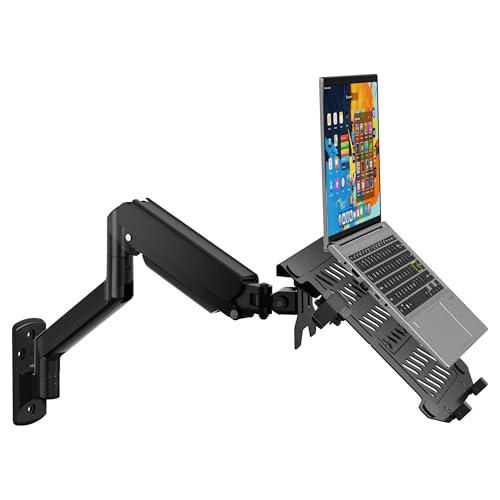
The WALI GSWM001LP offers full motion with a high-grade gas spring arm and supports laptops 10–17 inches and monitors from 17–32 inches, up to 22 pounds. It uses mounting holes of 75x75mm or 100x100mm, enabling relatively straightforward installation. The tilt range is +70° to -45°, with ±90° swivel and 360° rotation for flexible viewing. By saving desk space, this mount is designed to improve workflow and keep cables organized through integrated management features.
2-in-1 Laptop Wall Mount With Detachable Tray

This model accommodates 12–17 inch laptops and 17–32 inch monitors via VESA 75×75/100×100 mm. It features a detachable tray and a gas-spring arm with 250 mm height adjustment. Full rotation allows -90° to +90°, with a 21.6″ extension for optimal reach. The design emphasizes ergonomics, aiming to reduce neck and back strain while providing a secure, scratch-resistant tray to protect devices during use.
VIVO Sit-Stand Wall Mount STAND-SIT1L

The VIVO STAND-SIT1L combines a wall-mounted monitor and laptop workstation with adjustable height via a mechanical spring for the monitor and a pneumatic spring for the laptop tray. It supports 13–27 inch monitors up to 13.2 pounds and laptop trays for 11.6–17.3 inch devices. The unit offers +85° to -90° tilt, 180° swivel, 360° rotation, and height adjustment along a central pole. This option suits users seeking a true sit-stand solution with dual-position flexibility in compact spaces.
VIVO Height Adjustable Pneumatic Mount, MOUNT-V001GL

This model emphasizes a pneumatic height-adjustable arm for laptops 10–15.6 inches and up to 9.9 pounds. It supports +90° to -45° tilt, 180° swivel, and 360° rotation, with a ventilated tray designed to promote airflow around the laptop. A note highlights the counterbalance requirement to ensure smooth operation, making it suitable for users prioritizing easy vertical adjustments and device cooling.
WALI Laptop Wall Mount (GSWM001NLP)
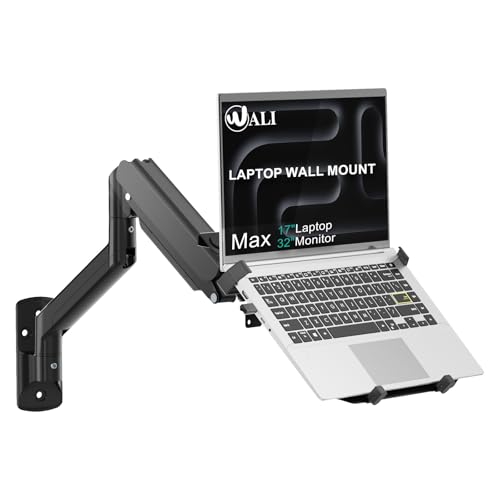
The GSWM001NLP version offers 17″–32″ monitor compatibility up to 22 pounds and 10″–17″ laptops up to 15.4 pounds. It provides versatile full-motion adjustments with a gas spring arm, offering 16.7″ to 19.3″ extension, +70°/-45° tilt, ±90° swivel, and 360° rotation. The unit emphasizes space-saving benefits and flexible positioning for both monitor and laptop tasks, with a focus on easy installation and stable clamping for various devices.
PUTORSEN 2-in-1 Laptop Wall Mount
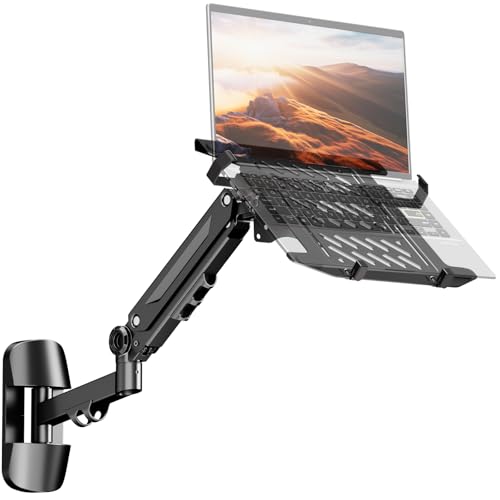
PUTORSEN combines 10–17 inch laptops with 17–40 inch monitors using VESA 75×75/100×100 mm compatibility. It offers a height-adjustable gas spring arm with -90°/+90° rotation and -45°/+45° tilt across a 21.6″ extension. The design emphasizes a sturdy, scratch-proof construction with rubber pads and a ventilated tray to help prevent overheating and keep devices secure during use. A practical choice for mixed laptop/monitor setups in compact spaces.
Buying Guide: Key Purchase Considerations
- Device compatibility: Confirm laptop size, monitor size, and total carrying weight to ensure the mount supports your devices.
- Motion and reach: Evaluate tilt, swivel, rotation, and arm extension to achieve ergonomic viewing angles and comfortable typing position.
- Installation and mounting pattern: Check VESA compatibility (75×75 mm or 100×100 mm) and wall mounting requirements for your space.
- Ventilation and cooling: Look for ventilated trays or open designs that promote airflow around the laptop to prevent overheating.
- Cable management: A built-in system helps keep wires organized and reduces desk clutter.
- Counterbalance and weight support: Some models use gas or pneumatic springs; ensure safe operation and proper counterbalance for smooth adjustments.
- Workspace impact: Consider how the mount affects room aesthetics, walkways, and convenience in rooms like kitchens, clinics, or classrooms.
- Durability and materials: Steel construction and scratch-resistant pads extend the life of the unit and protect devices during use.
- Maintenance and adjustments: Check the ease of height changes, tilt range, and the reliability of locking mechanisms.
- Price-to-feature balance: Compare the number of supported devices, the range of motion, and build quality to determine overall value for your needs.